
Why Most Boat Dealership Websites Fail to Convert
It’s no secret; when it comes to website design & digital marketing, most marine dealerships are years behind the current market. After working with over 50+ boat dealerships over the last 3 years, I’ve come to the conclusion that many of them are losing sales not because of their boats, but because of their websites.
Your website is supposed to be your best salesperson, working 24/7 to generate new leads and book demos or showings. But when it’s confusing to use, painfully slow, or optimized for the wrong things, it ends up doing the exact opposite: it drives potential buyers away.
So, in this post, I’m breaking down the three biggest website mistakes that kill your boat dealership’s conversions and how to easily fix each one before your competitors do.
Mistake #1: Confusing Navigation
Why Navigation Matters More Than You Think
One of the first things I look at when auditing a boat dealership’s website is the navigation. If I can’t find the inventory or a way to contact the sales team within a few seconds, I already know visitors are bouncing to either a marketplace site or a competitor.
Your buyers are not there to explore your site for fun. They have a purpose: to find a specific model, compare options, or get pricing info. If they can’t figure that out in a matter of seconds, they’ll just head to another dealership’s site that makes it easier.
Common Navigation Mistakes I See
The biggest issue I see when auditing sites is an overloaded navigation menu in the header (the top of the page). If you have 6 or more items in your primary navigation, odds are your users are already confused. My go-to strategy when designing new dealership sites is to decide on 5 primary menu items, typically “Boats For Sale, Service & Parts, Resources, Contact, and More”.
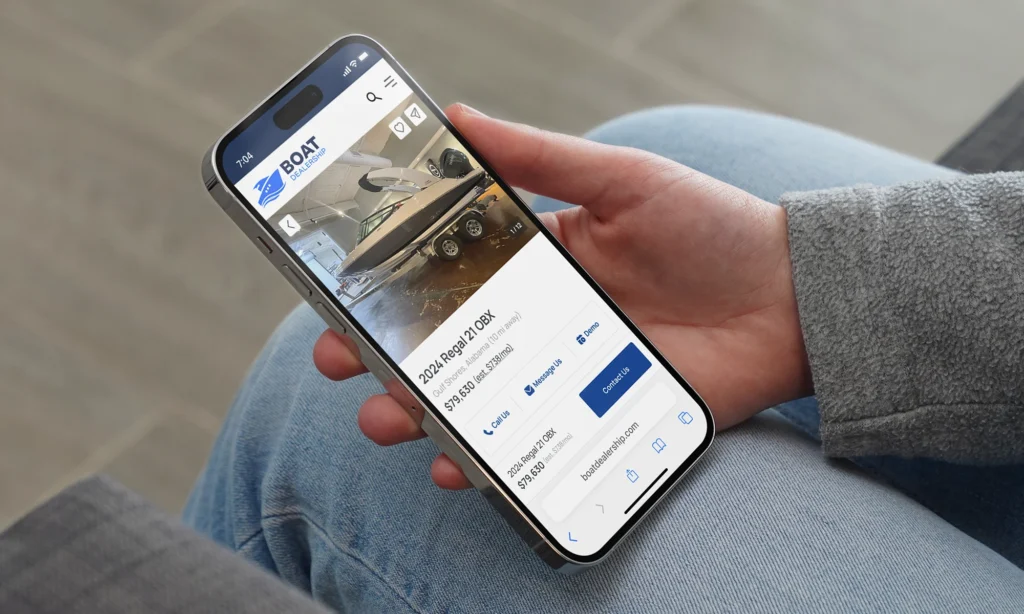
Another large issue that’s killing conversions, especially on mobile, is the placement of elements on your listing details page. Some sites either push the price of a boat down towards the bottom of the page, or make the font too small to stand out from the rest of the content on the page. You may think this is a clever trick to increase leads, but it’s actually frustrating your users who are simply looking for a quote.
Mistake #2: Slow Load Times
The Hidden Cost of a Slow Site
If there’s one issue that consistently kills conversion rates, it’s speed. I’ve seen beautiful websites packed with great inventory, but because they take 6 or 7 seconds to load, customers never stick around long enough to see them.
Every extra second of load time can drop conversions by up to 20%. That’s huge. Especially when most people are browsing boats on their phones. With certain sites, I’ve even seen load times of up to 65 seconds, which is a death sentence for anyone trying to navigate the site on mobile.
A slow site also impacts your SEO dramatically. If Google sees that users are navigating to your site, and then leaving after a few seconds due to slow load times, then your site is hidden below sites that have a better user experience.
What Usually Causes the Slowdown
From my experience, these are the main culprits:
- Massive, uncompressed images of boat photos or videos.
- Too many plugins or third-party scripts.
- Low-quality hosting that can’t handle traffic.
Here’s How I Fix It for Clients
The main issue I’ve ran into time and time again is video content slowing down a site. One client wanted a video more than a minute long to appear in the header of the site. While I agree video content is important to capture attention and stand out, page speed needs to be prioritized over having a flashy video. Make sure your videos are compressed, and no more than 10 seconds long.
When it comes to other common issues, here’s how I help:
- Compress every image before upload (TinyPNG or WebP format works wonders).
- Remove unnecessary plugins — keep only what’s essential.
- Upgrade to a reliable hosting plan built for performance.
- Use caching and a CDN like Cloudflare to deliver content faster.
Mistake #3: Focusing on the Wrong Areas to Optimize
Nobody Cares About Your Team
I’ve seen dealerships spend hours perfecting their “Our Team” page or uploading event photos, and while those are nice touches, they don’t actually drive conversions.
If your homepage and inventory pages aren’t optimized for leads, then polishing your About page won’t move the needle.
The 4 pages that matter most to your site:
- Inventory Pages — These are your bread and butter. Include detailed specs, clear pricing, high-quality photos, and “Call Now” or “Book a Test Ride” buttons.
- Financing Pages — Make it easy to apply or get pre-approved online.
- Homepage — Keep it clean and direct. Feature top models, current deals, and your strongest CTAs.
- Contact Page — Simple, visible, and mobile-friendly.
Keep The Branding for Social
I always advise dealerships to spend the resources they’d like to use for their about page on their social media channels. Users are already navigating Facebook and Instagram, so event photos or staff announcements will make much more of an impact here.
Don’t get me wrong, these “inner” pages of a website are important and should be updated, but they should never take priority over the main purpose of your website: selling boats.
Final Thoughts: Make It Simple, Fast, and Focused
I’ve worked with dealerships across the country to optimize their site for modern day users. When I audit their websites, the same story plays out over and over: beautiful designs, but broken experiences.
The solution isn’t complicated:
- Make it easy to navigate.
- Make it fast to load.
- Make it focused on what actually sells.
Your website should feel like a helpful salesperson, not a brochure or a maze.
Start with these three fixes, and you’ll notice the difference in your leads and conversions almost immediately.